

Every time a user opens an app and sees content that feels handpicked for them, there is AI working behind the scenes. AI personalization in mobile apps has gone from a competitive advantage to an absolute necessity now.
Users now expect their apps to know their habits, anticipate their needs, and deliver relevant experiences from the very first tap. And when apps fail to meet those expectations, users leave. Often for good.
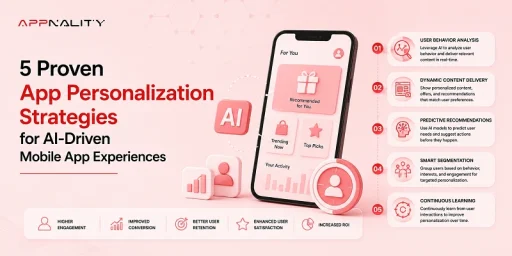
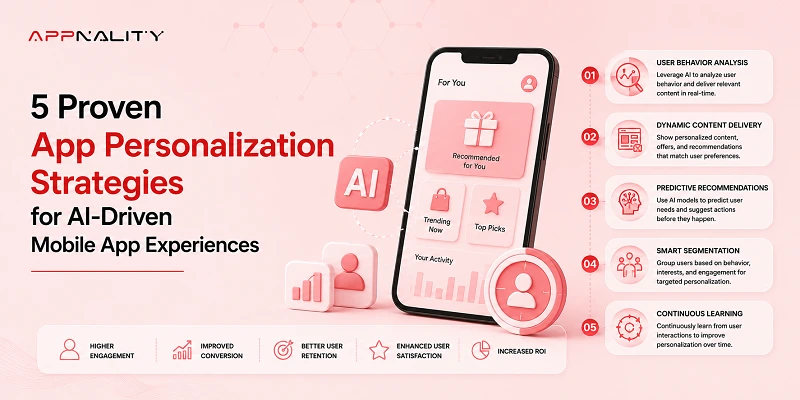
So, if you’re looking to create impactful AI-driven mobile app experiences, here are five proven app personalization strategies that we use at Appnality. These strategies are helping apps retain users, drive conversions, and grow revenue through smarter personalization.
Core Takeaways of Adaptive App Personalization Strategies
- Behavioral data is the most valuable input for any mobile app personalization AI system, yet most apps underuse it.
- AI-adaptive onboarding can boost early retention by personalizing the user’s first experience.
- Modern AI recommendation systems in mobile apps go far beyond simple “you might also like” prompts.
- Predictive AI makes push notifications feel helpful instead of intrusive.
- True personalization covers the entire in-app experience, including UI layout, feature order, and content delivery.
Why Personalization Has Become So Important in 2026
The mobile audience has changed. Gen Z and Gen Alpha users now represent the largest share of active app users globally, and their patience for cookie-cutter experiences is razor-thin. If your app greets every user with the same home screen, the same onboarding, and the same recommendations, you are already losing ground.
The numbers back this up. According to McKinsey’s personalization research, companies that get personalization right generate 40% more revenue from those activities than those that do not. That gap has only expanded as AI tools have become more accessible to development teams of all sizes.
There is also a multi-platform layer to this. Users switch between iOS and Android devices, tablets, and wearables throughout the day. They expect a consistent, personalized experience regardless of which device they pick up. That is why teams investing in hybrid app development are rethinking personalization at the architectural level, making sure AI models can function seamlessly across platforms.
A Quick Look at the 5 Strategies of AI Personalization in Mobile Apps
Either you are building from scratch or improving an existing app, here are five approaches that cover the full personalization stack, from the data layer to the user interface.
The five strategies below are practical, proven, and already being used by apps that understand where mobile is heading.
| S. No | Strategy | What It Does | Key Benefit | Best For |
| 1 | Drive Every Personalization Decision with Behavioral Data | Turns user actions like taps, scrolls, and session patterns into inputs for AI personalization models. | Grounds every decision in real behavior, not assumptions. | Apps with an existing and active user base. |
| 2 | Design Onboarding That Learns in Real Time | Captures micro-signals during onboarding to start personalizing before users reach the main screen. | Reduces early drop-off by making users feel understood immediately. | Apps with low Day 1 and Day 3 retention. |
| 3 | Build AI Recommendation Systems for Mobile Apps | Uses hybrid models combining behavior, context, and real-time signals for sharper recommendations. | Drives higher content consumption and purchase rates through relevance. | E-commerce, streaming, and marketplace apps. |
| 4 | Use Predictive AI for Push Notifications | Let AI determine the right message, tone, and send time for each individual user. | Cuts opt-out rates and lifts engagement by reaching users at the right moment. | Apps using push notifications as a core re-engagement tool. |
| 5 | Personalize the Full In-App Experience | Adapts UI layout, navigation, and feature visibility based on individual user behavior. | Reduces friction and builds long-term loyalty through an intuitive interface. | Mature apps ready to move beyond content personalization. |
1. Let Behavioral Data Drive Every Personalization Decision
Every tap, scroll, pause, and exit tells a story. Behavioral data captures how users actually interact with your app, not just what they say they want. This includes session duration, feature usage frequency, purchase history, scroll depth, and even the speed at which someone moves through a flow.
Most apps collect this data. Very few use it well. The difference between a mediocre personalization engine and a great one often comes down to how effectively behavioral signals are interpreted and acted upon.
How Leading Apps Use It in 2026
Spotify does not ask you what mood you are in every morning. It watches your listening patterns, cross-references the time of day, and serves a playlist that matches your likely state of mind. Duolingo adjusts lesson difficulty based on how quickly you answer, where you hesitate, and when you tend to drop off.
In 2026, the shift has moved from reactive personalization (responding after behavior) to predictive behavioral modeling (anticipating the next move). This is where app personalization strategies get genuinely powerful, because the app starts solving problems users have not even articulated yet.
Building this kind of intelligence into an app requires a data-aware architecture from the ground up. Retrofitting behavioral AI into a poorly structured codebase rarely delivers the results teams hope for.
2. Design Onboarding That Learns in Real Time
Onboarding is your first personalization opportunity. Most onboarding flows are static. Five screens, a few permission prompts, and a generic welcome message. The user taps through without engaging, and the app learns nothing about them.
That is a wasted opportunity. Onboarding is the moment when users are most willing to share preferences, interact with prompts, and signal what they care about. AI-driven mobile app experiences start at this exact point by treating every onboarding interaction as a data input, not just a formality.
In 2026, the smartest onboarding flows are adaptive. They monitor what users skip, what they tap on, how long they linger on a screen, and which options they select. Within seconds, the AI begins shaping the rest of the app experience around those early signals.
What a Smart Onboarding Flow Looks Like
If you are planning to build AI logic into your app’s early stages, the technical decisions you make around model selection and data pipelines matter enormously. We covered this in detail when discussing how to build an AI-powered app from a practical standpoint.
A well-designed AI onboarding system includes several critical components:
- Progressive profiling that asks one or two preference questions per session instead of front-loading everything.
- Real-time signal capture where skipped screens reduce future exposure to similar content.
- Dynamic path routing that sends power users and casual users down different onboarding tracks.
- Feedback loops that adjust the experience as more behavioral data accumulates over the first 48 hours.
3. Build AI Recommendation Systems for Mobile Apps
AI recommendation systems in mobile apps generally rely on two core approaches. Collaborative filtering looks at what similar users enjoyed and suggests those items to you. Content-based filtering analyzes the attributes of items you have already engaged with and finds similar ones.
Both have strengths. Both have blind spots. That is why the 2026 standard leans heavily toward hybrid recommendation models that combine collaborative signals, content attributes, and real-time contextual data like location, time of day, and device type.
| Parameter |
Static Rules Engine |
Machine Learning Engine |
| Data Basis |
Basic profile information (Age, City) |
Real-time behavior and session telemetry |
| Latency |
Medium (Dependent on database queries) |
Ultra-low (Cached vector embeddings) |
| User Value |
High repetition, low engagement |
Highly dynamic, evolving suggestions |
Why Most Recommendation Engines Underperform
The cold start problem remains one of the biggest hurdles. When a new user signs up, there is no behavioral history to draw from. Many apps default to generic “popular” recommendations at this stage, which immediately undermines the personalized experience they promised.
Stale data loops are another issue. If a recommendation engine keeps referencing behavior from weeks ago without factoring in recent changes, users notice. The suggestions feel outdated and irrelevant.
The fix involves building AI models that continuously learn and adapt, pulling from real-time user signals rather than relying on static historical datasets.
“How We Did it for Mustlpig”
When we worked on the Mustlpig project, AI-driven recommendation logic was a central part of the build. The results reinforced what we consistently see across projects: mobile app personalization AI works best when the recommendation layer is deeply integrated into the product, not bolted on as an afterthought.
4. Stop Generic Push Notifications & Let Predictive AI Decide
Push notifications are one of the most powerful retention tools in mobile. They are also one of the most abused. According to Airship’s 2025 benchmark report, the average opt-out rate for push notifications continues to climb year over year. The reason is simple. Most notifications are irrelevant, poorly timed, or both.
Sending the same promotional message to your entire user base at 10 a.m. on a Tuesday is not a strategy. It is noise.
How Predictive AI Changes Push Notifications
The broader trend here is clear. AI is reshaping nearly every layer of mobile app development, and notifications are just one piece of a much larger move toward predictive, context-aware systems.
Predictive AI flips the notification model. Instead of batch-and-blast, it analyzes each user’s behavioral patterns to determine three things: what message to send, when to send it, and how to phrase it.
Some users respond better to urgency-driven copy. Others engage more with curiosity-based prompts. Predictive models pick up on these preferences over time and optimize delivery accordingly.
On the platform side, Apple continues to refine how notifications are surfaced in iOS, with more aggressive notification summarization and focus modes. Building apps that work intelligently within these evolving constraints requires deep familiarity with iOS-specific development patterns and how Apple’s AI-powered notification stack behaves in 2026.
5. Personalize UI and UX for the Full In-App Experience
UI and UX should adapt to the user. Most conversations about AI personalization in mobile apps focus on content: recommendations, search results, and feeds. But the apps pulling ahead in 2026 are going further. They are personalizing the interface itself.
This means dynamic layouts that rearrange based on what a user accesses most frequently. It means adaptive navigation that surfaces different features for different user segments. It means even subtle visual adjustments, like font size or contrast, are based on accessibility signals.
AI-driven mobile app experiences at this level feel intuitive. Users cannot always pinpoint why an app feels “right,” but they notice when it does. And they definitely notice when it does not.
Making It Work Across iOS and Android
Personalization does not behave identically on every platform. Android users interact with widgets, notification trays, and back navigation differently than iOS users. App personalization strategies need to account for these behavioral differences at the design stage, not after launch.
For teams building on Android, this means leveraging platform-specific capabilities like adaptive layouts and Material You theming, and feeding those into the personalization engine.
At Appnality, we have seen firsthand how platform-aware personalization improves engagement metrics across the board. Small design decisions, like where a CTA sits or how a settings menu is organized, compound into meaningfully different user experiences when AI is tuning those decisions per user.
How to Measure Whether Your Personalization Is Actually Working
Personalization without measurement is guesswork. You need clear benchmarks tied to business outcomes, not just vanity metrics.
Here are the numbers worth tracking:
- 7-day and 30-day retention rates segmented by personalized vs. non-personalized cohorts.
- Average session length to see if users are spending more meaningful time in your app.
- CTR on personalized recommendations compared to generic placements.
- Churn reduction rate before and after AI personalization rollout.
- Revenue per user across personalized experiences.
- Notification engagement rate for AI-optimized sends vs. manual campaigns.
These metrics should continuously feed back into your AI models. AI-powered mobile app personalization is not a one-time implementation; it should constantly learn, adapt, and improve with every user interaction.
Final Thoughts
AI personalization in mobile apps is no longer about impressing users with clever suggestions. In 2026, it is a baseline expectation. The five strategies above, behavioral data, smart onboarding, advanced recommendation systems, predictive notifications, and full-experience personalization, each address a different layer of the user experience. Together, they create apps that feel genuinely personal.
The teams that commit to these app personalization strategies now will see compounding returns in retention, engagement, and revenue over the next 12 months.
If you are ready to build AI personalization into your mobile app, the team at Appnality can help. We work with startups and established businesses to design, develop, and launch apps that learn from every user interaction. Let’s talk about your project.