
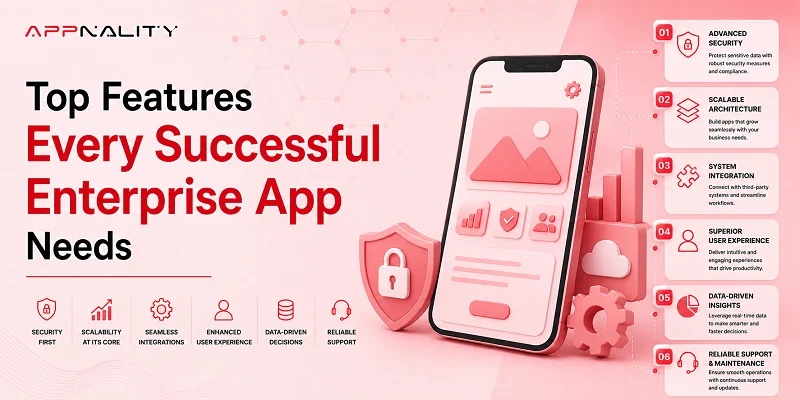

Running a business today is no easy task. With teams spread across different locations, customers expecting instant responses, and data coming in from every direction, staying on top of everything can feel overwhelming. That’s where enterprise apps come in. They’re not just another tool; they’re the engine that keeps day-to-day operations running smoothly. From helping employees collaborate seamlessly to giving managers real-time insights into performance, a well-designed enterprise app can transform how a company works.
But building an app that actually delivers value isn’t just about adding features. It’s about understanding what your business truly needs, avoiding common pitfalls like hybrid app performance issues, and choosing the right enterprise app development company to make interesting enterprise application development features.
In this blog, we’ll walk through the top features every successful enterprise app should have, why they matter, and how they can make a real difference for your business.
Why Enterprise Apps Matter More Than Ever
Enterprise apps aren’t just tools; they are the central nervous system of modern businesses. They connect people, processes, and data, making it easier to operate efficiently and respond to challenges quickly. In today’s era, where remote work, mobile access, and global operations are the norm, these apps are critical for keeping teams productive and informed.
Here’s how they make an impact:
Improve workflow and productivity: Enterprise apps streamline repetitive tasks, automate approvals, and organize processes, freeing employees to focus on strategic work. For example, a project management app can automate task assignment, reminders, and deadline tracking, reducing manual effort.
Foster real-time communication: Teams can collaborate instantly, share updates, and resolve issues as they arise, even if employees are in different locations or time zones. This reduces delays and ensures alignment across departments.
Collect and analyze operational data: Enterprise apps record key metrics and performance indicators, turning raw data into actionable insights. This empowers managers to identify trends, measure KPIs, and make informed decisions without relying on slow manual reporting.
Secure sensitive business information: From financial records to personal data, enterprise apps protect critical information with strong security measures and regulatory compliance, building trust with customers and stakeholders.
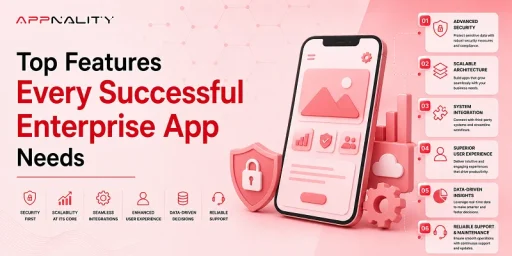
1. Robust Security & Data Protection
Security is the cornerstone of enterprise applications. With businesses handling sensitive data, from customer information and financial records to internal communications, any breach can have serious consequences, including financial loss, reputational damage, and regulatory penalties.
Key security measures include:
- End-to-end encryption: Ensures that all data transferred between users and the system is protected, preventing interception or misuse by unauthorized parties.
- Multi-factor authentication (MFA): Adds a layer of protection beyond passwords by requiring verification through devices, biometrics, or codes, significantly reducing the risk of unauthorized access.
- Role-based access control (RBAC): Grants users access only to the information and tools relevant to their role. For instance, HR teams may access employee records, while sales staff focus on CRM dashboards.
- Secure API communication: Many enterprise apps integrate with third-party systems such as ERP or CRM. Secure APIs prevent data leaks and ensure only authorized systems can interact with the app.
- Compliance with regulations: Industries like healthcare, finance, and retail require strict adherence to standards like GDPR, HIPAA, and ISO guidelines. Compliance not only avoids legal issues but also builds customer trust.
2. Intuitive User Experience (UX)
Even the most powerful enterprise app fails if it’s difficult to use. Employees of all technical skill levels must navigate the app easily, complete tasks efficiently, and access data without frustration. A clean, intuitive UX boosts adoption and ensures the app becomes an integral part of daily operations.
Important UX features include:
- Clear layouts: Organize information logically, prioritize important tasks, and minimize clutter. Users should quickly find what they need without extensive searching.
- Easy access to key features: Frequently used functions should be reachable within a few taps or clicks, reducing the time spent switching between tools.
- Role-based dashboards: Tailor the interface to different user roles. A manager’s dashboard may focus on performance metrics, while a field employee’s view highlights task updates and deadlines.
- Simplified workflows: Break complex processes into step-by-step actions to minimize errors and accelerate task completion.
3. Seamless Integration with Existing Systems
Businesses rarely operate in isolation. They use CRMs, ERPs, HR tools, finance systems, and more. A top enterprise app must integrate smoothly with existing systems so information flows without duplication or manual entry.
Common integrations include:
System Type |
Examples |
| CRM | Salesforce, HubSpot |
| ERP | SAP, Oracle |
| HR Platforms | Workday, BambooHR |
| Accounting | QuickBooks, NetSuite |
| Communication | Slack, Teams |
Seamless integration increases efficiency, reduces errors, and helps leaders make smarter decisions with up-to-date data from all sources.
4. Offline Access & Intelligent Syncing
Even in today’s connected world, internet access is not always reliable. Field teams, construction sites, and factories often operate in areas with poor connectivity. Enterprise apps must continue to function offline and sync automatically once a connection is restored.
Offline capabilities ensure:
Ongoing productivity: Employees can continue working without interruptions, logging data and completing tasks even when offline.
No lost data: Intelligent syncing ensures that all offline activities are automatically updated when connectivity returns, preventing information loss or duplication.
Smooth user experience: Users don’t have to wait for a network or rely on manual entry, maintaining consistency and efficiency across operations.
5. Real-Time Analytics & Reporting
In enterprise environments, timely insights can mean the difference between success and missed opportunities. Real-time analytics provides leaders with up-to-the-minute data to monitor operations, forecast trends, and make informed decisions.
Key features include:
Live dashboards: Display critical metrics and KPIs at a glance, enabling instant performance evaluation.
Customizable reports: Users can generate reports tailored to their needs, focusing on relevant data points without overwhelming information.
Predictive analytics: Advanced algorithms can forecast trends, anticipate bottlenecks, and suggest proactive actions.
Alerts for critical thresholds: Notifications trigger when performance deviates from expected ranges, allowing immediate corrective action.
6. User Role Management & Access Controls
Not all employees should have the same access. Enterprise apps must implement role-based permissions to ensure security, efficiency, and clarity.
Role-based access:
Enhances security: Limits sensitive information to authorized users only.
Reduces clutter: Users see only what’s relevant, making navigation easier and more efficient.
Improves productivity: Streamlined interfaces reduce cognitive load and allow employees to focus on their tasks.
Encourages audit-friendly governance: Easy tracking of who accessed what and when, critical for compliance and accountability.
7. Cross-Platform Compatibility
Enterprise users access apps from multiple devices, smartphones, tablets, desktops, or even wearables. A robust enterprise app must function seamlessly across all platforms to provide a consistent experience.
Compatibility should include:
- Mobile devices (iOS & Android): Users can perform tasks on the go.
- Web dashboards: For managers or analysts who prefer working on a desktop.
- Tablets and laptops: Allow flexibility in field operations or office environments.
- Wearables (where applicable): Useful in industries like logistics, healthcare, or manufacturing for quick alerts and hands-free interaction.
Cross-platform support reduces training costs, prevents platform lock-in, and ensures employees can access the tools they need anytime, anywhere.
8. Custom Notifications & Alerts
Timing is crucial in business. Generic alerts are often ignored, but personalized notifications that matter to specific roles drive action and improve efficiency.
Smart notifications include:
Role-based alerts: Only send relevant information to users based on their responsibilities.
Actionable messages: Allow users to respond directly from the notification, e.g., approve requests or complete tasks.
Multi-channel delivery: Reach users via SMS, email, or in-app messages to ensure critical alerts aren’t missed.
Filters to prevent fatigue: Avoid overwhelming users with unnecessary notifications.
Well-timed notifications can prevent delays, reduce errors, and keep operations running smoothly.
9. Advanced Search & Filtering
Enterprise apps manage massive datasets, and finding the right information quickly is essential. Advanced search capabilities transform overwhelming data into actionable insights.
Features include:
- Real-time suggestions: Auto-complete and predictive search save time.
- Saved filters: Users can reuse common search criteria, speeding up repeated queries.
- Metadata tags: Enhance organization and allow complex queries across multiple dimensions.
- Natural language search: Makes it easy for non-technical users to find information using conversational queries.
Powerful search functionality saves hours of effort each week and ensures that users can focus on decision-making rather than data hunting.
10. Built-in Collaboration Tools
Modern work is inherently collaborative. Enterprise apps should provide integrated tools to support teamwork without relying on multiple third-party platforms.
Built-in collaboration features include:
- Messaging: Real-time chat for team discussions.
- Shared task lists: Keep everyone aligned on project progress.
- Comments and annotations: Allow users to provide feedback directly in context.
- File sharing: Centralized document storage reduces duplication and confusion.
Integrated collaboration strengthens team cohesion, reduces delays, and ensures everyone has access to the same information.
Addressing Hybrid Mobile App Development Misconceptions
Hybrid mobile app development has become a popular alternative to native development due to its cost‑efficiency and faster development cycles. But it’s also surrounded by myths and performance concerns that often confuse business leaders.
To make an informed decision, let’s bust some common hybrid app misconceptions:
Myth: Hybrid Apps Are Always Slow
Contrary to popular belief, modern hybrid frameworks like Flutter and React Native can deliver performance close to native apps, especially when optimized correctly. Performance depends on code quality, architecture, and prioritizing critical paths.
Myth: Hybrid Apps Can’t Access Native Features
While it’s true that hybrid apps sometimes need plugins to access native device features, many frameworks now offer robust support for hardware-level APIs, including camera, GPS, and sensors.
Reality: Hybrid Can Be a Smart Choice — When Done Right
A hybrid mobile app development company can be ideal for enterprise apps that need cross-platform reach without a huge budget, provided performance requirements are moderate and proper optimization is applied.
In some cases, however, hybrid mobile apps may show hybrid app performance issues such as slight delays in graphics rendering or heavier load times compared to fully native builds. These issues are not inherent flaws; they stem from architectural trade-offs and should be evaluated carefully in planning.
That’s why partnering with the right developer is critical.
Read this detailed guide about common hybrid app development myths.
How to Choose the Right Enterprise App Partner
If you’re ready to build an enterprise app that scales, performs, and delivers business value, then choosing the right development partner is key.
Look for an enterprise app development company that provides:
- Strategic consultation on architecture and feature planning
- Expertise in modern technologies and frameworks
- Experience integrating with existing enterprise systems
- Strong security and compliance practices
- Post-launch support and ongoing optimization
A trusted partner won’t just build your app; they’ll help you refine your vision and deliver a product users love.
And that’s where Appnality comes in.
Why Appnality is Your Best Choice for Enterprise Mobile App Development
At Appnality, we don’t just develop apps; we engineer enterprise solutions that solve real business challenges. Whether you need mobile transformation, advanced analytics, secure workflows, or seamless integrations, our team brings the full spectrum of capability and innovation.
From requirement discovery and UX design to final deployment and continuous app maintenance, Appnality is your strategic partner for success.
Conclusion
Building a successful enterprise app is more than just coding a tool; it’s about creating a solution that enhances productivity, secures data, integrates seamlessly with existing systems, and delivers a delightful user experience. From robust security and real-time analytics to offline functionality and intelligent notifications, the core enterprise app functionalities we’ve discussed are essential for modern businesses seeking a competitive edge.
Whether you’re considering a native or hybrid approach, understanding hybrid app development myths and potential hybrid app performance issues is critical for making informed decisions. Partnering with a trusted enterprise app development company ensures your app is not only technologically sound but also aligned with your business goals.
The digital landscape is evolving fast, and the right enterprise app can empower your teams, delight your customers, and drive long-term growth. Don’t settle for anything less than a solution designed for success.